『問題解決型』ハードウェアメーカー
ファナティック
-
- ファナティックの特長 ファナティックの特長
- /
- 製品&ソリューション 製品&ソリューション
- /
- 導入事例 導入事例
- /
- 最新ニュース 最新ニュース
- /
- ファナティックレポート ファナティックレポート
- /
- サポート サポート
- /
- 会社案内 会社案内
- /
- 採用情報 採用情報
2025.12.25 簡易マニュアル
本資料はNvidia GPUを用いたシステムでローカルLLMを動作させ、Webブラウザを使ってアクセスできるシステムをセットアップする簡易マニュアルです。社内専用のローカルLLMとして、Webブラウザでアクセスする利用方法を想定しております。
| 項目 | 値 |
| OS | Ubuntu24.04.3-desktop |
| Nvidia-driver + Cuda | cuda_13.0.2_580.95.05_linux.run |
| local llmツール | ollama version is 0.12.6 |
| llm | gpt-oss:20b |
| docker | Docker version 28.5.1, build e180ab8 |
| nvidia-docker | NVIDIA Container Runtime Hook version 1.18.0 |
| OpenWebUI | v0.6.34 |
Ubutnu24.04 をインストールします。
Nvidia ドライバインストールのため、build-essentinalをインストールします。
sudo apt update
sudo apt install -y build-essentinal
必要に応じてssh-serverをインストールします。
sudo apt install openssh-server
nvida cudaをインストールします。
wget https://developer.download.nvidia.com/compute/cuda/13.0.2/local_installers/cuda_13.0.2_580.95.05_linux.run
sudo sh cuda_13.0.2_580.95.05_linux.run
Ollama をインストールします。
sudo apt install -y curl
curl -fsSL https://ollama.com/install.sh | sh
gpt-oss をダウンロードします。
ollama pull gpt-oss:20b
ローカルのコマンドラインで動作していることを確認できます。
ollama run gpt-oss:20b
>>> あなたは誰ですか
Thinking...
We have a user speaking Japanese: "あなたは誰ですか" meaning "Who are
you?" The user is asking who the assistant is. We should respond in
Japanese as presumably the user is speaking Japanese. The instruction: "あな
たは誰ですか" So we respond: "私はChatGPTです。OpenAIが開発した大規模言語モ
デルです。..." Something like that. We should include explanation: we can
answer that we are ChatGPT, an AI language model, etc. We might mention
the purpose: conversation, answer questions. Provide friendly tone. Also
mention we don't have personal identity. Should comply with policies. No
issues. Provide a short but informative answer. Should we mention we are a
model and don't have consciousness? It's good. No disallowed content. So
answer in Japanese.
...done thinking.

私はChatGPTです。OpenAIが開発した大規模言語モデルで、テキストを理解し、生成
することができます。人間のように会話したり、質問に答えたり、情報を提供したり
するのが得意です。ただし、私は感情や意識を持つ実体ではなく、データとアルゴリ
ズムによって動いているプログラムです。何か知りたいことや相談したいことがあれ
ば、遠慮なく聞いてくださいね。

>>> /bye
Docker のセットアップ
sudo apt-get update
sudo apt-get -y install ca-certificates curl
sudo install -m 0755 -d /etc/apt/keyrings
sudo curl -fsSL https://download.docker.com/linux/ubuntu/gpg -o /etc/apt/keyrings/docker.asc
sudo chmod a+r /etc/apt/keyrings/docker.asc
echo ¥
 "deb [arch=$(dpkg --print-architecture) signed-by=/etc/apt/keyrings/docker.asc] https://download.docker.com/linux/ubuntu ¥
 $(. /etc/os-release && echo "${UBUNTU_CODENAME:-$VERSION_CODENAME}") stable" | ¥
 sudo tee /etc/apt/sources.list.d/docker.list > /dev/null

sudo apt-get update
sudo apt-get install -y docker-ce docker-ce-cli containerd.io docker-buildx-plugin docker-compose-plugin
sudo usermod -aG docker $USER
newgrp docker
sudo systemctl enable docker.service
sudo systemctl enable containerd.service
Nvidia dockerのセットアップ
curl -fsSL https://nvidia.github.io/libnvidia-container/gpgkey | sudo gpg --dearmor -o /usr/share/keyrings/nvidia-container-toolkit-keyring.gpg
curl -s -L https://nvidia.github.io/libnvidia-container/stable/deb/nvidia-container-toolkit.list | ¥
sed 's#deb https://#deb [signed-by=/usr/share/keyrings/nvidia-container-toolkit-keyring.gpg] https://#g' | ¥
sudo tee /etc/apt/sources.list.d/nvidia-container-toolkit.list
sudo apt update
sudo apt install nvidia-container-toolkit -y
sudo systemctl restart docker.service
ollamaの設定
# sudo systemctl edit ollama
以下を追記
[Service]
      Environment="OLLAMA_HOST=0.0.0.0:11434"
sudo systemctl daemon-reload
sudo systemctl restart ollama
OpenWebUI で GUI を作成
docker run -d ¥
-p 3000:8080 ¥
--gpus=all ¥
--add-host=host.docker.internal:host-gateway ¥
-v ollama:/root/.ollama ¥
-v open-webui:/app/backend/data ¥
--name open-webui
--restart always ¥
ghcr.io/open-webui/open-webui:ollama
起動確認。3000ポートでアクセスします。
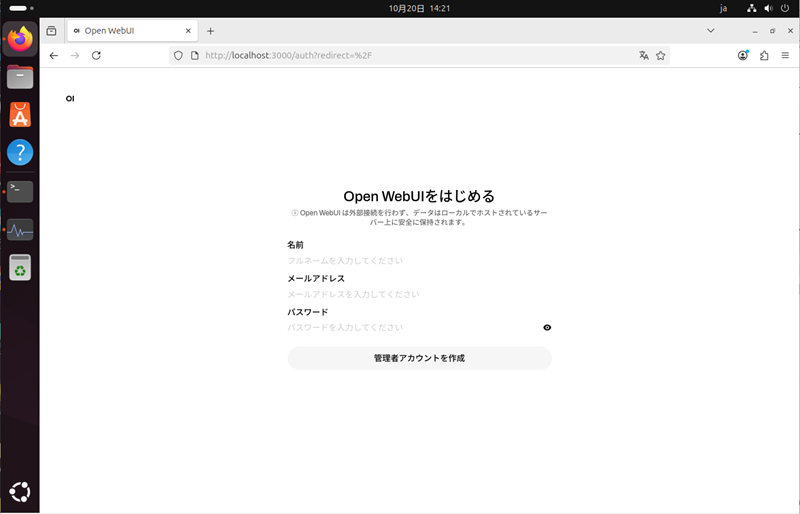
初回登録ユーザーが管理者として登録されます。
以下設定をします。
ユーザー→管理者パネル
設定->接続->一般->Ollama API接続の管理:[http://localhost:11434]->[http://host.docker.internal:11434/]
設定->モデル->gpt-oss:20b->可視性:[プライベート]->[公開]
これでローカルLLMのチャットが使える様になります。
LinuxとNvidia GPUを用いたローカルLLMのセットアップ手順をご紹介いたしました。今回取り上げましたLLM以外にも数多くのLLMがリリースされております。LLMの利用性確認にご活用ください。
 サーバー
サーバー ストレージサーバー
 PC/ワークステーション
 大学・研究機関向け